Superseded Version and Basis Version

Background

Prior to the implementation of FERC Order 714 (April 2010), interstate gas tariffs had been filed electronically for years.  In those days, tariffs were broken into tariff sheets, which had very specific requirements for the information displayed in their headers and footers.

One specific header requirement was that when a tariff sheet was filed to replace an earlier version of the same sheet, the header must read as highlighted in the example below.

The Tariff Filing & Management System (commonly known as TFMS), a software product which was widely used throughout the gas industry, supported this header requirement by providing an association between a tariff sheet being filed and the sheet it superseded.  In the example above, Fourth Revised Sheet No. 12 would have been associated (or linked) with Third Revised Sheet No. 12.  Via this association, TFMS was able to automatically create a document header like the one shown above.

In this same time frame, it was necessary to submit marked (or redlined) documents to FERC that indicated the tariff changes that were being proposed.  This requirement was not unlike the “Marked Tariff Changes” rule in Order 714.  TFMS provided an association between a tariff sheet being filed and a previously filed tariff sheet in order to indicate the “basis” for the redlined changes.  Via this association, TFMS would automatically create a redlined tariff sheet header like the one shown below.  Highlighted in the header is the associated “basis” tariff sheet.

Superseded Version and Basis Version in TariffShark

When TariffShark was being designed, we worked closely with our gas industry customers.  Roughly half of them expressed a desire to continue working with sheets under eTariff.  Primarily, their thinking was that it would be less disruptive to both their internal business processes and their customers than it would be to change over to a section-based tariff approach.  Therefore, TariffShark was built with features that parallel TFMS’s sheet associations described above.

Specifically, Tariff Record Versions (TRVs) can be associated with other TRVs in two different ways.  First, a TRV’s “Superseded Version” field can be used to indicate which TRV is superseded.  Second, a TRV’s “Basis Version” field can be used to indicate which TRV forms the basis for its marked content.  These fields appear on both the “Create Tariff Record Version” and “Update Tariff Record Version” forms within TariffShark.  The image below highlights these fields on the Update Tariff Record Version form.
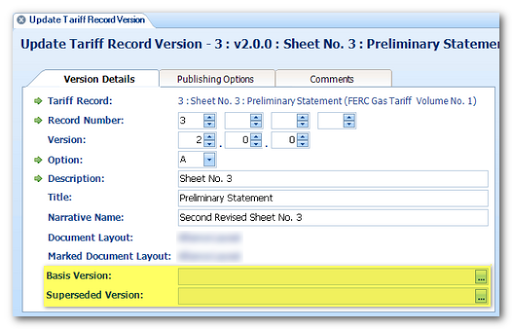
These fields are provided for backward compatibility with TFMS and with the old way of managing and filing sheet-based tariffs.

  • You would use these fields if you have configured TariffShark headers to include the sheet-style “Superseding” clause.
  • You might use these fields for your own internal recordkeeping purposes.
  • These fields are not required by FERC.
  • The data populated in these fields is not sent to FERC in the XML file.

If you have questions, please post them in the comments below or contact TariffShark Support.
TariffShark and Microsoft Office 2010

We have completed our testing and TariffShark Premier (v1.1.x) for Microsoft Office 2007 is compatible with Microsoft Office 2010.  If you have Microsoft Office 2010 on your desktop and you need to run TariffShark, install TariffShark Premier (v1.1.x) for Microsoft Office 2007 and all features of TariffShark will be fully functional.

Via a single client installer, TariffShark Hammerhead (v2.x) is compatible with Microsoft Office 2007 and 2010.  Hammerhead does not support Microsoft Office 2003 (or prior).

If you encounter any issues running TariffShark in conjunction with Microsoft Office 2010, contact TariffShark Support and we will be happy to assist.

FERC Filing Types Updated

On Monday, April 18, 2011, FERC posted an updated definition of eTariff filing types (http://www.ferc.gov/docs-filing/etariff/filing_type.csv).  Per the January 2011 eTariff technical conference (check out our recap), FERC has added a citation column to the list of filing types in order to aid tariff filers in submitting the proper type of filing for their particular filing scenario.

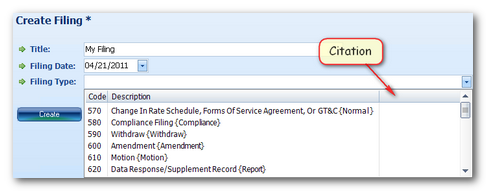
In keeping with FERC’s goal, we are working on a software update to TariffShark Release 2.0 (previously v1.1) that will display citation references.  In this update, TariffShark’s Create Filing form will add citation to the list of Filing Types (as shown below).


In addition, the next major release (TariffShark 2.0) will include a feature that allows you to view your company’s available Filing Types at any time.

[Update: May 12, 2011] TariffShark Release 3.0 (previously v1.1.172) has been released and includes the added function described above.

TariffShark Dashboard: Document Processing

Background

The content of section-based and sheet-based Tariff Record Versions (TRVs) can be edited from within TariffShark using Microsoft Word. The “Edit Content” and “Build Content” commands provide this capability.  When you save a TRV’s content, TariffShark files the document away in the database in a temporary holding location and places it in line for content processing.  Content processing causes the TRV’s content to be stored in various formats needed to support XML generation, Tariff publishing, attachment assembly, and more.  At the conclusion of this process the TRVs content is permanently saved.

If you and other users are editing a lot of TRVs, the list (queue) of TRVs awaiting document processing can grow.  In addition, there are other activities that take place in TariffShark that cause TRVs to become queued for document processing.  For example, if you update a Filing’s FERC Filing Date field and that date appears in the footer of the Filing’s TRVs, all of these TRVs will be queued for document processing so that the footer can be updated to reflect the new FERC Filing Date.

Monitoring the Queue Via the Dashboard

Click the gauge icon on the toolbar (circled below)…or select “View | Dashboard” from the menu…or press Ctrl-D on your keyboard and the Dashboard is displayed.

The last two tabs of the Dashboard (“Processing Queue” and “Failed Processing”) display information that can help you monitor the document processing queue.

PROCESSING QUEUE

The “Processing Queue” tab lists all TRVs that are awaiting document processing.  Under normal work loads, this list will be very short or empty.  The number in parenthesis displays how many TRVs are in the queue.

FAILED PROCESSING


The “Failed Processing” tab lists all TRVs that failed document processing.  It is rare indeed that the document processing for a TRV will fail, however, it does happen on occasion.  The number in parenthesis displays how many TRVs have failed processing.  If the number displayed is greater than zero, the tab will turn red in color.

TRVs listed in the Failed Processing tab may be resubmitted for document processing by clicking the “Requeue” button.  Also, you can view a failed TRV’s content by clicking the “View Content” button.

If a TRV ever refuses to be processed successfully and gets stuck in the Filed Processing list, contact TariffShark Support and we will be happy to assist.