Category: Uncategorized

The "FERC Response" Field

A Filed Tariff Record Version (FTRV) can be thought of as a proposal to FERC to affect a change in one’s tariff.  The status of such a change is called the “FERC Response”.  FERC Response, therefore, is a very important FTRV field.  TariffShark supports several FERC Response values.  Presented alphabetically below, this blog article defines all of TariffShark’s FERC Response values.

Approved

An FTRV that has been approved by FERC but cannot yet be considered Effective.

Approved Subject to Conditions

An FTRV that has been approved by FERC as long as certain changes are made and the TRV is refiled.

Draft

A Draft FTRV is one that is being worked on and has, therefore, not yet been filed with FERC. All details associated with a Draft FTRV and its underlying TRV, including its content, may be updated. A Draft FTRV and its underlying TRV may also be deleted.

Effective

An FTRV that has been filed with and approved by FERC is designated Effective when it is to be considered part of an effective Tariff. For example, when two related FTRVs have been filed with FERC and only one was approved, it might not make sense to mark either of them Effective until both have been approved.

Overtaken by Events

An FTRV that has been filed with FERC but has been subsequently replaced by a more recently filed FTRV. For example, if you filed Rate Schedules v3.0.0 and realized a week later that textual changes were missed and needed to be filed as a correction, upon filing and FERC accepting Rate Schedules v4.0.0 in an amendment filing, Rate Schedules v3.0.0 is considered to be “Overtaken by Events”.

Pending

An FTRV that has been filed with FERC and on which FERC has not yet acted (either through the issuance of an order or by the tolling of the statutory clock).

Pro Forma Ordered

When a Pro Forma FTRV is submitted to FERC it does not represent a true proposal before the commission. Therefore, many of the FTRV FERC Response values presented here do not apply. So that a Pro Forma FTRV doesn’t remain “Pending” forever, assign a FERC Response of “Pro Forma Ordered” after FERC has issued an order in response to a Pro Forma submission.

Rejected

An FTRV that has been rejected by FERC order.

Retired

At your discretion, you may change an FTRV’s status to Retired when it is no longer in effect. This is not necessary, however, since TariffShark knows which TRV is in effect when several versions of the same Tariff Record are all Effective. For example, given the following Effective FTRVs:
  • “Rate Schedules” v0.0.0, effective 4/1/2010
  • “Rate Schedules” v1.0.0, effective 5/1/2010
  • “Rate Schedules” v2.0.0, effective 6/1/2010
TariffShark knows that “Rate Schedules” v1.0.0 is the one that is in effect on 5/15/2010 and that “Rate Schedules” v2.0.0 is in effect on 9/1/2010.

Suspended

An FTRV that has been suspended by FERC order.

Withdrawn

An FTRV that was filed with FERC but was subsequently withdrawn prior to FERC action.

When assigning a FERC Response value to an FTRV, the valid values for a given situation depend upon the FTRV’s Record Change Type.  For example, it is not possible to assign a FERC Response of “Effective” to an FTRV that was submitted to FERC with a Record Change Type of “Pro Forma” (because Pro Forma requests are not official proposals before the commission).  You needn’t worry about which FERC Response values are valid and which ones are not: TariffShark will only provide you with valid choices.

If you have questions about FERC Response, we’d love to hear from you.  Please comment below or contact TariffShark Support.
Tariff Record Version (TRV) Queue Processing

Tariff Record Version (TRV) Queue Processing runs automatically when TariffShark is running.  It is responsible for converting section-based and sheet-based Tariff Record Versions’ marked content edited in Microsoft Word into marked DOC, clean RTF, marked PDF, clean PDF, and plain text formats.  To make it unobtrusive, the work is done in the background.  To make it as quick and efficient as possible, the work is distributed across all logged in TariffShark users.

A section-based or sheet-based TRV is automatically submitted for document processing when a user saves the TRV’s content in Word.  Once submitted, it waits in a line (or queue) behind other TRVs that need to be processed.

Once in line, each TRV has up to three (3) attempts to finish processing successfully.  TRV queue processing status can be monitored from the Dashboard (for the context company).  A TRV that failed queue processing (one with zero retries left) can be re-submitted for processing from the “Failed Processing” tab on the Dashboard.  All document processing associated with a TRV queue item is performed on the client computer.   Files are temporarily saved in the temp folder and, once all content is ready, the data is permanently saved on the server.

As a user, you can manage the frequency at which TariffShark checks the queue for new content to be processed by adjusting the “Queue Processing Interval” setting.  Valid values are integer numbers between 5 and 300 (seconds).  If there are a lot of TRVs in the queue and you’d like them processed as quickly as possible, a low number of seconds keeps your computer busy processing TRVs.  If you don’t want your computer slowed down by processing TRVs, use a higher number of seconds, but be advised that the TRV Queue will be cleared out more slowly.  To learn how to change the Queue Processing Interval, check out the blog article entitled TariffShark Document Processing.

Automated Queueing of TRVs

If a TRV’s Document Layouts use Header and/or Footer Templates that leverage TariffShark data fields, any change in the fields’ values automatically submits the TRV for document processing.  Further, if a Header or Footer Template is updated, all TRVs that use Document Layouts that leverage the updated Template will automatically be submitted for processing.  Use great caution when updating Header and Footer Templates because if they’re widely used, many, many TRVs could be inserted into the TRV Queue.

No doubt, this is a complex topic…and we would be happy to clarify it further.  Simply comment below or contact TariffShark Support.

Does My eTariff Filing Have to Include Tariff Records?

In last week’s blog article, eTariff Filing Level Associations, we introduced nine broad filing type categories.  This article will use the same broad categories to answer the question “does my eTariff filing have to include tariff records”?

Normal – A “normal” filing generally initiates a statutory action against an existing eTariff.  As such, proposed changes to an electronic FERC tariff would be made by submitting tariff records.

New – A “new” filing establishes a new Tariff Id (FERC’s term for what TariffShark calls a Tariff Database).  This type of filing must include tariff records.

Refiled – Like a “new” filing, a “refiled” filing establishes a new Tariff Id.  This type of filing must include tariff records.

Compliance – The circumstances surrounding a “compliance” type filing vary greatly.  Some compliance filings will include tariff records and some will not.

Amendment – An “amendment” filing proposes changes to an earlier eTariff filing pending before the Commission.  What’s being amended in a amendment filing are tariff records.  Therefore, this type of filing must include tariff records.

Motion – A “motion” filing motions into effect tariff record from an earlier eTariff filing.  Therefore, tariff records must be included in a motion filing. In order to add tariff records from an earlier filing to a “motion” filing, the Filed Tariff Record Versions in the earlier filing must have a FERC Response of Suspended”.

Withdraw – The sole purpose of a “withdraw” type filing is to withdraw an earlier eTariff filing pending before the Commission.  A withdraw type filing must not include tariff records.

Report – Similar to an “amendment” filing, a “report” filing is used to supplement the record of an earlier eTariff filing pending before the Commission.  Unlike the “amendment” type, however, a report type consists solely of attachments.  Statutory tariff records are not allowed in this type of filing.  It is valid, however, to include pro forma tariff records within a “report” filing.

Cancellation – A “cancellation” filing proposed to cancel an entire Tariff Id (FERC’s term for what TariffShark calls a Tariff Database).  A cancellation filing must include a single tariff record, which carries the proposed effective date of the cancellation.

To summarize…

Type of Filing Includes Tariff Records?
Normal Always
New Always
Refiled Always
Compliance Sometimes
Amendment Always
Motion Always
Withdraw Never
Report Pro Forma Only
Cancellation Exactly 1

If you would like to know more including tariff records in your eTariff filings or if you have any other questions, please comment below or contact TariffShark Support.

Effective Dates in TariffShark

There are three separate effective date fields in TariffShark.  Two of these are stored in the database and the other is calculated (or derived) by the TariffShark software for display.  This article describes each of these effective dates in detail.

Proposed Effective Date

The Proposed Effective Date is the one you enter when you place a Tariff Record Version into a Filing.  This is the date that is sent to FERC in the XML.  This date is stored in TariffShark as a Filed Tariff Record Version (FTRV) data element.

FERC Effective Date

The FERC Effective Date is the one approved by FERC.  This information is often included in a FERC order.  However, it can also be inferred depending on the FERC program (gas, oil, electric) and the circumstances surrounding the filing (for example, oil tariffs typically go into effect 30 days after filing without the issuance of a FERC order).  This date is stored in TariffShark as an FTRV data element.

Effective Date

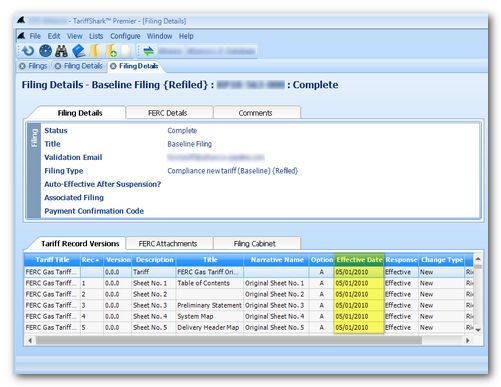
The Effective Date, which appears in several grids in TariffShark, is a computed date.  This date is perhaps most frequently seen in the Tariff Record Versions grid on the Filing Details screen (shown highlighted below).


In TariffShark Hammerhead Release 4.0.x and earlier, the rules for computing “Effective Date” are…

  • If the FERC Response of the FTRV is Approved Subject to Conditions, Pending, Rejected, Draft, Overtaken by Events, Pro Forma Ordered, or Withdrawn, the Proposed Effective Date is used.
  • If the FERC Response of the FTRV is Approved, Effective, Suspended, or Retired, the FERC Effective Date is used.  If the FERC Effective Date is empty, however, the Proposed Effective Date is used.

The rules for computing “Effective Date” in TariffShark Hammerhead SP1 Release 4.1 and later are…

  • If the FERC Response of the FTRV is Pending, Rejected, Draft, Overtaken by Events, Pro Forma Ordered, or Withdrawn, the Proposed Effective Date is used.
  • If the FERC Response of the FTRV is Approved, Approved Subject to Conditions, Effective, Suspended, or Retired, the FERC Effective Date is used.  If the FERC Effective Date is empty, however, the Proposed Effective Date is used.

If you would like to know more about effective dates in TariffShark or if you have any other questions, please comment below or contact TariffShark Support.